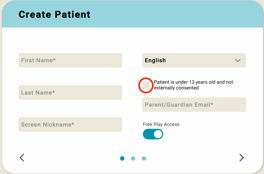
When you create a patient in ARWell PRO, you need to enter their name, a nickname (what the app will call them sometimes), and choose their settings. One of the most important steps for setting up a new patient is getting the COPPA consent right.
You should see a statement that reads: "patient is under 13 years old and not externally consented" with a toggle beside it. This toggle/box needs to be un-selected in order for the app to collect data about your patient's activities in the app. There are a couple of ways to get consent from a parent.
- Send the guardian an email within the app (enter it in the box on the patient creation page)
- Ask the parent to find the email (it should arrive momentarily), sometimes in spam. It will come from support@augmenttherapy.com
- Ask them to read the consent and click the box at the bottom.
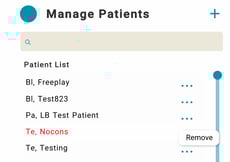
- You should then see the patient's name on your patient list in black.
- Add the COPPA consent language into your clinic's initial intake paperwork, and ask parents to sign consent as part of their intake.
- If this is your clinic's workflow, you need to uncheck that box on the patient creation screen for each new patient you create!
- If this is your clinic's workflow, you need to uncheck that box on the patient creation screen for each new patient you create!